

16. 操作別まとめ
| やりたいこと | 操作 |
|---|---|
| Vertex Groupを作る | Object Data Properties > Vertex Groups > + |
| VertexをGroupに入れる | Vertexを選択 > Weight指定 > Assign |
| Weightを100%にする | Weight 1.000でAssign |
| Weightを50%にする | Weight 0.500でAssign |
| Groupから外す | Vertexを選択 > Remove |
| Group内のVertexを選択する | Vertex Groupを選択 > Select |
| Weight値を確認する | Edit Mode > Nキー > Item > Vertex Weights |
| Weightを塗る | Weight Paint Modeで対象Groupを選択して塗る |
| Shape KeyにGroupを指定する | Shape Keys > 対象Key > Vertex Group欄で指定 |
17. Shape Keyが動かないときの最短チェックリスト
Shape KeyのValueを動かしても形状が変わらない場合は、次の順で確認します。
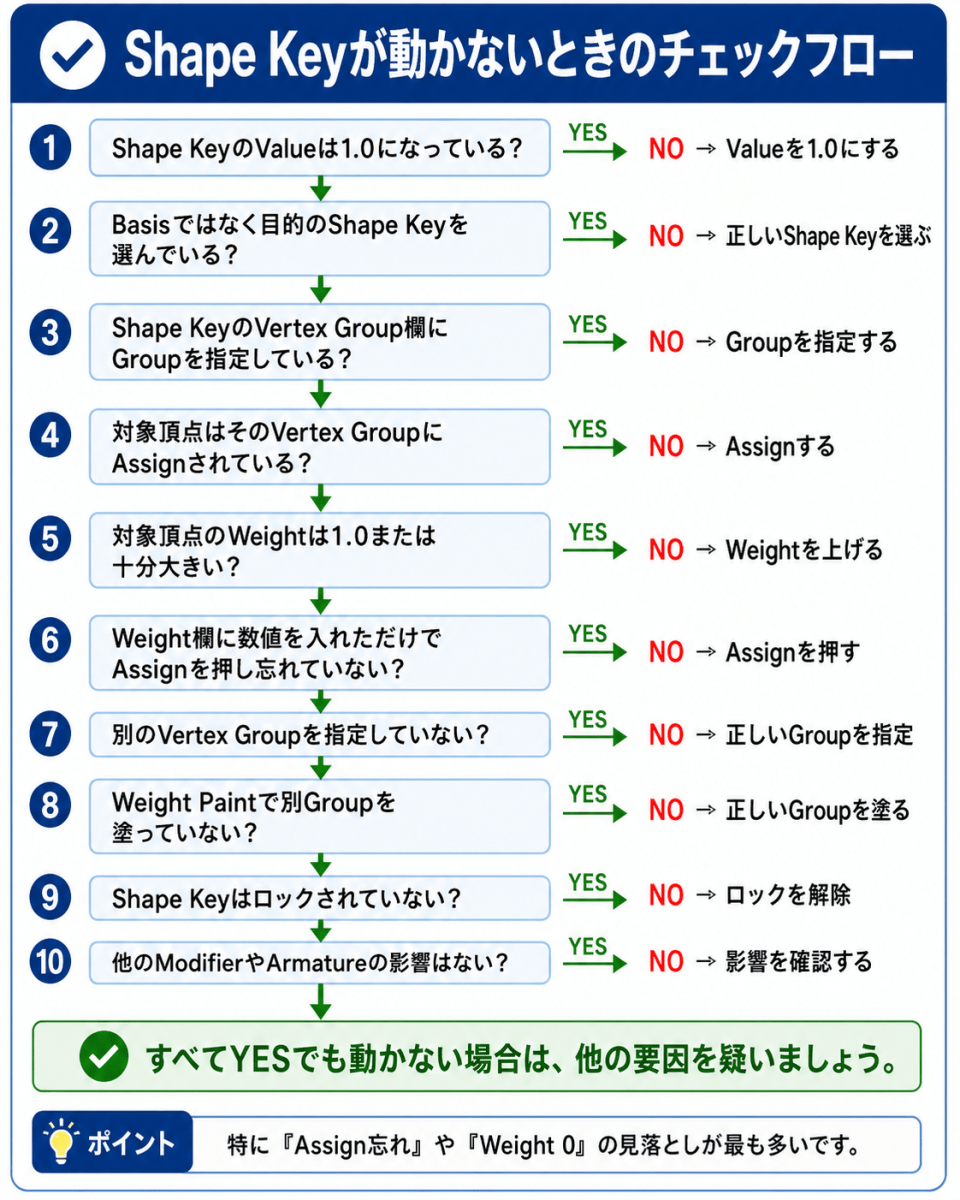
- 対象Shape KeyのValueが1.000になっているか。
- Basisではなく、目的のShape Keyを選択しているか。
- Shape KeyのVertex Group欄にGroupが指定されているか。
- 指定したVertex Groupに対象VertexがAssignされているか。
- 対象VertexのWeightが1.000、または十分大きい値か。
- Weight欄に数値を入れただけで、Assignを押し忘れていないか。
- 別のVertex GroupをShape Key欄に指定していないか。
- Weight Paintで別のVertex Groupを塗っていないか。
- Shape Keyの鍵アイコンがロックされていないか。
- Armatureや他のModifierの影響で見え方が変わっていないか。
特に重要なのは次です。
Vertex Groupを指定したShape Keyが動かない場合は、
まず対象VertexにWeightがAssignされているかを確認する。
18. Weightのまとめ
| Weight | 意味 | Shape Keyへの影響 |
|---|---|---|
| 0.000 | 0% | 効かない |
| 0.250 | 25% | 少し効く |
| 0.500 | 50% | 半分効く |
| 0.750 | 75% | 強く効く |
| 1.000 | 100% | 最大に効く |
Shape Key用途では、まず Weight 1.000でAssign して動作確認し、その後でWeight Paintを使って境界をぼかすと扱いやすいです。
19. Auto Normalizeのまとめ
| 用途 | Auto Normalize |
|---|---|
| Shape Key用Vertex Group | 基本OFF |
| Armature / Bone Weight調整 | ONを検討 |
| Shape KeyとBone Weightを同じメッシュで扱う場合 | 混同に注意 |
Shape Key用Vertex Groupでは、Auto Normalizeによって他のVertex GroupのWeightが意図せず変わる可能性があるため、基本的にはOFFが安全です。
20. 最終まとめ
Shape KeyのVertex Group指定は、編集対象を限定する機能ではありません。
指定したVertex GroupのWeightに応じて、Shape Keyの変形結果を制限する機能です。
そのため、Vertex Groupを使ったShape Keyが動かない場合は、まず次を確認します。
Vertex Groupを作っただけで終わっていないか
対象VertexをAssignしているか
Weightが1.000または十分大きい値になっているか
Vertex Groupを作成しただけでは、Vertexは登録されていません。
Vertexを選択してAssignした時点で、所属とWeightが設定されます。
Shape Key用のVertex Groupでは、まずWeight 1.000でAssignして動作確認し、必要に応じてWeight Paintで境界をぼかす方法が分かりやすいです。
また、Shape Key用途だけなら、Auto Normalizeは基本OFFでよいです。
Auto Normalizeは主にArmatureやBone Weightの調整で使う機能なので、Shape Key制限用のVertex Groupとは目的を分けて考えるのが安全です。
【根拠】
Blender公式マニュアルでは、Shape KeyのVertex Groupは、Shape Keyの変形をVertex Groupに制限する項目として説明されています。また、Vertex GroupのWeightは、Edit ModeやWeight Paint Modeで確認・編集できる情報です。
【注意点・例外】
この記事ではShape Key用途を中心に説明しています。Armature ModifierやBone Weight調整では、Auto NormalizeやNormalize Allの扱いが重要になる場合があります。リギング用途では、Shape Key用Vertex GroupとBone変形用Vertex Groupを分けて管理する方が安全です。複雑なキャラクターリグでは、専門家に確認が必要な場合があります。
【出典】
Blender Manual — Shape Keys Panel
https://docs.blender.org/manual/en/latest/animation/shape_keys/shape_keys_panel.html
Blender Manual — Vertex Groups
https://docs.blender.org/manual/en/latest/modeling/meshes/properties/vertex_groups/index.html
Blender Manual — Vertex Weights
https://docs.blender.org/manual/en/latest/modeling/meshes/properties/vertex_groups/vertex_weights.html
Blender Manual — Weight Paint Introduction
https://docs.blender.org/manual/en/latest/sculpt_paint/weight_paint/introduction.html
コメントを残す